so-you-think-you-can-code-2025
Orchestrating the Machine: A Generic Sequencer for TS and GLSL
By: Coop (Starfighter & Magnus Thor)
Category: 🎨 Demoscene & Graphics
Note: For demoscene veterans, this approach may be common knowledge. The goal of this post is to provide a clear, practical guide for a wider audience looking to master complex visual timing in their code. That said, we—the authors—believe it is still well worth the read. And yes, we also used AI.
To turn a shader into a complex visual performance, you need a Sequencer. It is the Conductor that ensures every visual event happens exactly when it should. This system is elastic, bit-packed, and mathematically locked to the rhythm of a song.
Unlike traditional animation timelines, this approach treats time as a domain, not a stopwatch — allowing the same logic to run on the CPU, the GPU, or entirely standalone inside a shader.
1. The Case for Relative Units
Most beginners use absolute seconds (e.g., “At 10 seconds, do this”). This is intuitive — but fundamentally brittle. If you change the BPM, extend an intro, or reorder scenes, every timestamp downstream breaks. Absolute time tightly couples creative structure to real-world playback.
Avoiding the “If-Else” Spaghetti
The most common mistake is building a timeline out of long chains of conditional logic:
if(t > 10.0 && t < 20.0) { ... } else if(t > 20.0) { ... }
This creates spaghetti code almost instantly. Not only is it a nightmare to maintain, but branching in a shader is expensive. GPUs prefer deterministic, mathematical flows. By mapping time to a relative domain, we replace dozens of fragile if checks with a single, clean lookup that the GPU can process efficiently.
Instead, we treat time as a domain, not a stopwatch, and normalize it into relative units that scale naturally with BPM, sample rate, and scene structure.
World Space Time & Playhead
To support this, we define a World Space constant — in our case:
L = 170000
This constant defines the resolution of our timeline. Seconds belong to the browser or OS; World Space Time belongs to the demo.
Mathematically, L represents the Total Timeline Duration in a fixed unit. By setting L = 170000, we are effectively defining a 170-second capacity (170,000 ms). This value is a careful balance: if L is too small, your resolution suffers from floating-point precision issues; if it is too large, you risk hitting the limits of a float on certain GPU hardware.
The playhead, which tracks progress through the timeline, is computed as:
\[{playhead} = \frac{t \times 1000 \times 44.1}{L \times 2}\]-
t= elapsed time in seconds -
44.1= sample rate in kHz (44.1 kHz) -
L= world space resolution
This maps real time into discrete sequencer units. Every scene and effect is now defined in this consistent, relative space.
Mapping Bars, Beats, and Milliseconds
Let’s define some quantities:
-
Fs= sample rate (samples per second, e.g., 44.1 kHz) -
BPM= beats per minute -
BPB= beats per bar
Samples per beat:
\[{samplesPerBeat} = \frac{Fs \times 60}{BPM}\]Samples per bar:
\[{samplesPerBar} = \text{samplesPerBeat} \times BPB\]Milliseconds → relative units:
\[{units} = \frac{ms \times Fs}{L \times 2}\]Bars → relative units:
\[{units} = \frac{bars \times BPB \times 60 / BPM \times 1000 \times Fs}{L \times 2}\]These formulas show how tempo, bar length, and sample rate all scale naturally in world-space time.
Relative Units Decouple Tempo and Structure
-
Doubling
Lslows the entire production uniformly. -
Doubling
BPMcompresses bars into shorter time spans, but scene order and effect timing remain intact. -
Milliseconds and bars collapse into the same sequencer space, usable both on CPU and GPU.
This is exactly how musical notation works: a score does not change if you play it faster or slower — only the conductor’s tempo does.
Think like this
-
time→playhead→scene→progress→flags→phase→effect -
Relative units unify perceptual timing (ms), musical structure (bars), and GPU-friendly deterministic sequences.
-
Sample rate (
Fs) acts as the bridge between discrete audio processing and continuous visual timing.
By thinking in relative, world-space time, we create a system that is robust, musically coherent, and GPU-native, while remaining flexible to tempo changes or structural edits.
2. The Rhythmic Sequencer Result
This implementation converts human time (milliseconds) and musical time (beats, bars) into a single relative sequencer space.
The timeline itself does not care where time came from — only that it arrives normalized.
This allows you to:
-
Score shaders like sheet music
-
Mix perceptual timing with musical structure
-
Keep runtime math extremely cheap and GPU-friendly
TypeScript Implementation
/**
 * A timeline-based sequencer for managing musical scenes and progress tracking.
 * Handles conversion between different time units and maintains current playback state.
 */
export class Sequencer {
    /** The ID of the currently active scene */
    public currentSceneId: number = 0;
    /** Flags associated with the current scene */
    public currentFlags: number = 0;
    /** Progress within the current scene (0.0 to 1.0) */
    public progress: number = 0; // 0.0 to 1.0 within the scene

    /**
     * Creates a new Sequencer instance.
     * @param timeline - Array of scene data where each scene is [duration, flags, sceneId]
     * @param bpm - Beats per minute for musical timing calculations
     * @param beatsPerBar - Number of beats in each bar for musical timing
     */
    constructor(
        private timeline: any[][],
        public bpm: number = 120,
        public beatsPerBar: number = 4
    ) {}

    /**
    * Converts milliseconds into Relative Units for timeline positioning.
    * Best for intros, breakdowns, FX tails, silence.
    * @param ms - Duration in milliseconds
    * @param totalLength - Total length of the timeline in some reference unit
    * @returns The duration in relative units
    */
    getUnitsFromMs(ms: number, totalLength: number): number {
        return (ms * 44.1) / (totalLength * 2);
    }

    /**
    * Converts musical bars into Relative Units for timeline positioning.
    * Best for grooves, drops, verses, repeating structures.
    * @param bars - Duration in musical bars
    * @param totalLength - Total length of the timeline in some reference unit
    * @returns The duration in relative units
    */
    getUnitsFromBars(bars: number, totalLength: number): number {
        const secondsPerBeat = 60 / this.bpm;
        const secondsPerBar  = secondsPerBeat * this.beatsPerBar;
        return this.getUnitsFromMs(bars * secondsPerBar * 1000, totalLength);
    }

    /**
     * Updates the sequencer state based on the current playback time.
     * Determines which scene is currently active and calculates progress within that scene.
     * @param seconds - Current playback time in seconds
     * @param L - Total length parameter used in unit conversion calculations
     */
    update(seconds: number, L: number): void {
        let playhead = (seconds * 1000 * 44.1) / (L * 2);

        let cursor = 0;
        let localTime = playhead;

        while (
            cursor < this.timeline.length - 1 &&
            this.timeline[cursor][0] < 255 &&
            localTime >= this.timeline[cursor][0]
        ) {
            localTime -= this.timeline[cursor++][0];
        }

        const activeScene = this.timeline[cursor];
        this.currentFlags = activeScene[1];
        this.currentSceneId = activeScene[2];

        this.progress = Math.min(Math.max(0, localTime / activeScene[0]), 1);
    }
}
Timeline Authoring Pattern
const L = 170000;
const seq = new Sequencer([], 120, 4);

/**
* AUTHORING GUIDELINE:
*
* - Use milliseconds for perceptual timing
* - Use bars for musical structure
* - Let the sequencer collapse both into world space
*/
const SS = [
    [seq.getUnitsFromMs(1800, L), 0x4000, 1], // Intro
    [seq.getUnitsFromBars(4, L), 0x4001, 2], // Groove
    [seq.getUnitsFromMs(1200, L), 0x0000, 3], // Breakdown
    [seq.getUnitsFromBars(8, L), 0x4000, 4], // Drop
    [255, 0x0000, 0]                          // End Sentinel
];
3. Usage in the Animation Loop
const sequencer = new Sequencer(SS, 120);

const animate = (timestamp: number) => {
    requestAnimationFrame(animate);
    sequencer.update(timestamp / 1000, L);

    Renderer.render({
        u_time: timestamp / 1000,
        u_progress: sequencer.progress,
        u_flags: sequencer.currentFlags,
        u_sceneId: sequencer.currentSceneId
    });
};
The End Sentinel (255) marks the end of the timeline, ensuring loops always terminate safely. This lets us bake the timeline directly into GLSL without adding bounds checks, making GPU iteration simple, safe, and deterministic.
4. The GPU Handshake (Uniforms)
uniform float u_time;
uniform float u_progress;
uniform int   u_flags;
uniform int   u_sceneId;
These four values fully describe global state.
Bit-Packed Flags
bool isFlagSet(int flag) {
    return (u_flags & flag) != 0;
}
The sequencer controls when, not what.
5. The GLSL Transpiler
static bakeToGLSL(timeline: any[][]): string {
    let glsl = `struct Scene { float d; int f; int id; };\n`;
    glsl += `Scene ss[${timeline.length}];\n`;

    timeline.forEach((s, i) => {
        glsl += `ss[${i}] = Scene(${s[0].toFixed(4)}, ${s[1]}, ${s[2]});\n`;
    });

    return glsl;
}
6. Standalone Runtime
Fully runnable GLSL code to run on Shadertoy. No CPU. No history. No state.
Example 1 – Without Beat Pulse
#define L 170000.0

struct Scene {
    float d;
    int f;
    int id;
};

Scene ss[4];

void getSequenceState(float time, out int id, out float prog, out int flags) {
    float phead = (time * 1000.0 * 44.1) / (L * 2.0);

    ss[0] = Scene(0.3243, 0x4000, 1);
    ss[1] = Scene(0.6485, 0x0001, 2);
    ss[2] = Scene(0.1297, 0x4001, 3);
    ss[3] = Scene(255.0, 0, 0);

    float acc = 0.0;
    id = 0; prog = 0.0; flags = 0;

    /* NOTE: On some GPUs, accumulating small floats in a loop (acc += ss[i].d)
    can lead to precision "drift" over long timelines. For production,
    pre-calculate absolute start/end times in your Transpiler. */
    for (int i = 0; i < 4; i++) {
        if (phead >= acc && phead < acc + ss[i].d) {
            id = ss[i].id;
            flags = ss[i].f;
            prog = clamp((phead - acc) / ss[i].d, 0.0, 1.0);
            return;
        }
        acc += ss[i].d;
    }
}

void mainImage(out vec4 fragColor, in vec2 fragCoord) {
    int sId; float sProg; int sFlags;
    getSequenceState(iTime, sId, sProg, sFlags);

    vec3 col = vec3(0.0);
    if (sId == 1) col = vec3(0.8, 0.2, 0.2);
    if (sId == 2) col = vec3(0.2, 0.2, 0.8);
    if (sId == 3) col = vec3(0.2, 0.8, 0.2);

    float fade = smoothstep(0.0, 0.25, sProg) *
                (1.0 - smoothstep(0.75, 1.0, sProg));

    if ((sFlags & 0x4000) != 0) {
        vec2 uv = fragCoord / iResolution.xy;
        col *= 0.5 + 0.5 * pow(16.0 * uv.x * uv.y *
            (1.0 - uv.x) * (1.0 - uv.y), 0.1);
    }

    fragColor = vec4(col * fade, 1.0);
}
Example 2 – With Beat Pulse
#define L 170000.0

struct Scene {
    float d;
    int f;
    int id;
};

Scene ss[4];

void getSequenceState(float time, out int id, out float prog, out int flags) {
    float phead = (time * 1000.0 * 44.1) / (L * 2.0);

    ss[0] = Scene(0.3243, 0x4000, 1);
    ss[1] = Scene(0.6485, 0x0001, 2);
    ss[2] = Scene(0.1297, 0x4001, 3);
    ss[3] = Scene(255.0, 0, 0);

    float acc = 0.0;
    id = 0; prog = 0.0; flags = 0;

    for (int i = 0; i < 4; i++) {
        if (phead >= acc && phead < acc + ss[i].d) {
            id = ss[i].id;
            flags = ss[i].f;
            prog = clamp((phead - acc) / ss[i].d, 0.0, 1.0);
            return;
        }
        acc += ss[i].d;
    }
}

void mainImage(out vec4 fragColor, in vec2 fragCoord) {
    int sId; float sProg; int sFlags;
    getSequenceState(iTime, sId, sProg, sFlags);

    vec3 col = vec3(0.0);
    if (sId == 1) col = vec3(0.8, 0.2, 0.2);
    if (sId == 2) col = vec3(0.2, 0.2, 0.8);
    if (sId == 3) col = vec3(0.2, 0.8, 0.2);

    float fade = smoothstep(0.0, 0.25, sProg) *
                (1.0 - smoothstep(0.75, 1.0, sProg));

    // Example: Pulsating effect driven by flags + beat phase
    if ((sFlags & 0x4000) != 0) {
        /* TIP: Edge Detection. Use sProg to trigger one-time events at
        the start of a scene, like this flash that decays immediately. */
        float trigger = smoothstep(0.1, 0.0, sProg);

        float beatPhase = fract(sProg * 4.0);           // 4 pulses per scene
        float pulse     = sin(beatPhase * 6.28318);    // TAU
        pulse = pulse * 0.5 + 0.5;                      // normalize 0-1
        col *= mix(0.7, 1.3, pulse) + trigger;          // pulse + flash
    }

    fragColor = vec4(col * fade, 1.0);
}
7. Scene Structure vs. Behavioral Flags
A crucial design choice is the separation of structure and behavior.
-
Scenes (
sceneId) define temporal order — answer: where are we in the composition? -
Flags (
u_flags) define active behaviors — answer: what is allowed to happen right now?
The sequencer guarantees scenes run in sequence. Visual effects do not need to be bound to scene IDs — they are gated by flags and optionally modulated by the scene progress.
Beat-Synchronous Pulsation (Phase-Based)
float beatPhase = fract(sProg * pulsesPerScene);
float pulse     = sin(beatPhase * TAU) * 0.5 + 0.5;
if ((sFlags & PULSE_FLAG) != 0) col *= mix(0.7, 1.3, pulse);
Scenes define time.
Flags define behavior.
Phase defines rhythm.
8. Live Tool: The Sequencer Laboratory
Theory is best paired with practice. We have built a Sequencer Laboratory where you can live-author your timelines using this exact logic. Input musical bars or milliseconds, and the tool will generate Absolute Anchored GLSL code.
Try it here: https://zw36jp.csb.app/
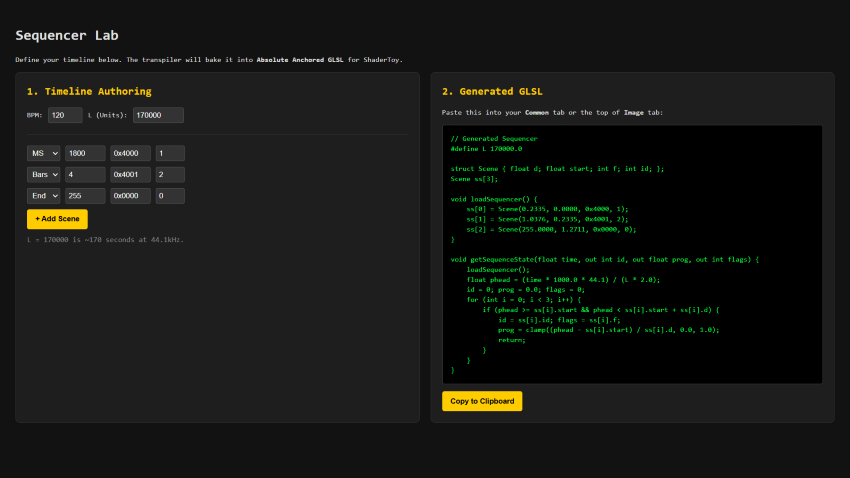
The Baked Output
// Generated glslcode
#define L 170000.0

struct Scene { float d; float start; int f; int id; };
Scene ss[3];

void loadSequencer() {
    ss[0] = Scene(0.2335, 0.0000, 0x4000, 1);
    ss[1] = Scene(1.0376, 0.2335, 0x4001, 2);
    ss[2] = Scene(255.0000, 1.2711, 0x0000, 0);
}

void getSequenceState(float time, out int id, out float prog, out int flags) {
    loadSequencer();
    float phead = (time * 1000.0 * 44.1) / (L * 2.0);
    id = 0; prog = 0.0; flags = 0;
    for (int i = 0; i < 3; i++) {
        if (phead >= ss[i].start && phead < ss[i].start + ss[i].d) {
            id = ss[i].id; flags = ss[i].f;
            prog = clamp((phead - ss[i].start) / ss[i].d, 0.0, 1.0);
            return;
        }
    }
}
Integration in mainImage
void mainImage(out vec4 fragColor, in vec2 fragCoord) {
    // 1. Extract the current state from the playhead
    int sId; float sProg; int sFlags;
    getSequenceState(iTime, sId, sProg, sFlags);

    // 2. Drive visuals using progress and flags
    vec3 col = vec3(0.0);

    // Scene-based color
    if (sId == 1) col = vec3(1.0, 0.5, 0.2);
    if (sId == 2) col = vec3(0.2, 0.6, 1.0);

    // Flag-based behavior (e.g., a fade-in flash)
    float flash = smoothstep(0.1, 0.0, sProg);
    if ((sFlags & 0x4000) != 0) col += vec3(flash);

    fragColor = vec4(col, 1.0);
}
9. Size-Coding: A tiny Conductor
For those in the size-coding community, the “Relative Domain” logic is a goldmine because it can be compressed into a tiny, branchless loop. We can pack both the Scene ID and Control Flags into a single float to keep the array slim.
Note: We are not expert size-coders, code golfers, or crunchers, so please keep that in mind. We also highly recommend reading Måten Rånges’s article published the 13th of december : “Disassembling a Compact Glow-Tracer” —it is an absolute masterpiece.
// s.xyz = duration, start, packed(id + flags)
// We pack ID in the 1s place and Flags in the 10s place.
// Example: 31.0 = Scene ID 1 + Flag 3
vec3 s[4] = vec3[](
    vec3(1.94, 0, 11),   // Sc 1: 15s (ID 1, Flag 10)
    vec3(1.94, 1.94, 2), // Sc 2: 15s (ID 2, No Flags)
    vec3(1.94, 3.88, 33),// Sc 3: 15s (ID 3, Flag 30)
    vec3(255, 5.82, 0)   // Blackout sentinel
);

void mainImage(out vec4 O, vec2 U) {
    // p = Playhead: Current time mapped to World Space
    float p = iTime * .13, t;

    // O *= 0.0 is the shortest way to initialize fragColor to black
    O *= 0.;

    for(int i=0; i<4; i++) {
        vec3 v = s[i];

        // Check if the current playhead is within this scene's window
        if (p >= v.y && p < v.y + v.x) {

            // Calculate local progress (0.0 to 1.0) within the active scene
            t = (p - v.y) / v.x;

            // Decode packed float: Modulo gets the ID, Division gets the Flag
            int id = int(v.z) % 10;
            int fl = int(v.z) / 10;

            // Golfed scene selection using a nested ternary chain
            O = id < 1 ? O*0. :
                id < 2 ? vec4(1,.5,.2,1) :
                id < 3 ? vec4(.2,.6,1,1) : vec4(.2,.8,.2,1);

            // Behavior: If Flag > 0, apply a rhythmic pulse modulation
            if(fl > 0) O *= sin(t * 31.4) * .5 + .5;

            // Visual accent: Add a white flash that decays at scene start
            O += smoothstep(.2, 0., t);
        }
    }
}
Tricks Applied:
-
Float Packing: By using
11for “ID 1 with Flag 10,” we avoid needing a second array or avec4. Simple division and modulo are the cheapest ways to decode state in restricted environments. -
Multiplier Collapse: Rounding the playhead multiplier to
.13saves bytes over using the full.1297. In a 1k intro, precision is often traded for space. -
Zeroing Output:
O *= 0.is a standard size-coding idiom. It clears any garbage data in the output vector using fewer characters than an assignment. -
The Progress Formula:
t = (p - v.y) / v.xis the heart of the system—it transforms global time into a local0.0-1.0ramp used for all animations and easing.
Conclusion: Scoring the Machine
This sequencer is not about triggering effects — it is about orchestrating behavior.
By treating time as a world space, scenes as relative durations, flags as behavior toggles, and progress as phase, we gain a system that is:
-
Musically intuitive
-
Mathematically robust
-
GPU-native
-
Immune to refactors and tempo changes
The shader does not merely react to time — it performs it.
The GPU is not just rendering pixels — it is reading a score.
And the sequencer is the conductor. 🎼
Thanks for your time. ```