so-you-think-you-can-code-2025
🎄 Node-RED Choreographing Christmas Lights to Rhythmic Markov Melodies
Note: Throughout this article, I’ve used AI assistance to help refine the text, structure explanations, and craft clear descriptions and comments. All code, ideas, and implementation details are my own — the AI simply helped shape the presentation.
Introduction
Elevate your holiday decor from static to sensational with Node-RED! This article presents a sophisticated automation flow that uses a Markov Chain to compose unique, rhythmically diverse Christmas “songs.” More than just music, these compositions are then translated into a dazzling light show, perfectly synchronized to the beat and duration of each generated note, ideal for smart bulbs like Philips Hue.
We’ll guide you through the initial trigger, dive deep into the JavaScript code that brings the music and lights to life, and provide the complete Node-RED flow JSON for instant deployment in your smart home.
💡 What is Node-RED? A Simple Automation Tool
Before diving into the code, it’s worth noting how easy it is to get started with Node-RED.
Node-RED is a low-code, flow-based programming tool that allows you to wire together hardware devices, APIs, and online services in a visual editor. Its key appeal lies in its ease of setup and broad compatibility:
-
Easy Setup: You build applications by connecting “nodes” (pre-built functions) in a visual workspace, significantly reducing the complexity of traditional coding.
-
Platform Versatility: Node-RED is built on Node.js and runs on:
- Single-board computers (like Raspberry Pi)
- Cloud services (AWS, Azure)
- Docker containers
- Local devices (Windows, macOS, Linux)
This wide support makes it the perfect tool for local IoT projects like our automated light show!
To get started, visit the official Node-RED documentation: https://nodered.org/docs/getting-started/
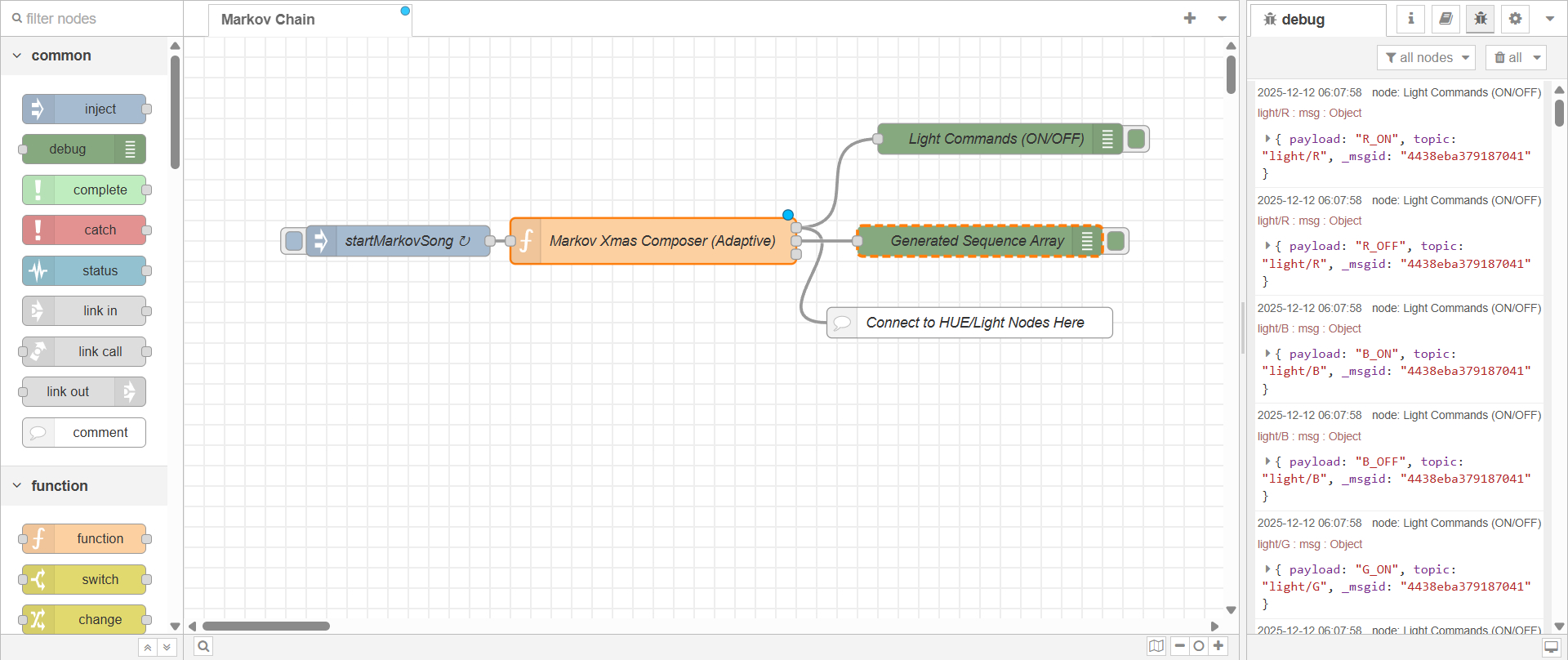
1. The Spark: Our Node-RED Inject Node
Every grand automation begins with a simple trigger. In our festive flow, the journey starts with a precisely configured inject node:
[
  {
    "id": "4fdd9cd2416ad679",
    "type": "inject",
    "z": "3d276c0322cf82ba",
    "name": "startMarkovSong",
    "props": [
      { "p": "payload" },
      { "p": "topic", "vt": "str" }
    ],
    "repeat": "50",
    "crontab": "",
    "once": false,
    "onceDelay": 0.1,
    "topic": "",
    "payload": "object",
    "payloadType": "date",
    "x": 170,
    "y": 80,
    "wires": [
      ["622b427c4733b1bf"]
    ]
  }
]
"name": "startMarkovSong"— marks the purpose of this node."repeat": "50"— triggers a new song every 50 seconds."wires": [...]— sends the event to the next node (the composer).
2. The Brain: Our Markov Christmas Composer Function Node
This is your musical engine and choreographer, implemented as a Node-RED Function Node.
const transitions = {
    'E': [
        {note: 'E', dur: 1.0}, {note: 'E', dur: 1.0}, {note: 'E', dur: 0.5},
        {note: 'E', dur: 0.5}, {note: 'E', dur: 1.0}, {note: 'G', dur: 0.5}
    ],
    'G': [
        {note: 'C', dur: 1.0}, {note: 'C', dur: 0.5}, {note: 'C', dur: 1.0},
        {note: 'D', dur: 0.5}
    ],
    'C': [
        {note: 'D', dur: 1.0}, {note: 'D', dur: 0.5}, {note: 'E', dur: 1.0}
    ],
    'D': [
        {note: 'E', dur: 1.0}, {note: 'E', dur: 0.5}, {note: 'E', dur: 1.0},
        {note: 'E', dur: 0.5}
    ],
    'START': [
        {note: 'E', dur: 1.0}, {note: 'D', dur: 1.0}, {note: 'C', dur: 1.0}
    ]
};

const colorMap = {
    'E': 'R', // Red
    'D': 'G', // Green
    'C': 'W', // White
    'G': 'B'  // Blue
};

const targetBPM = 80;
const tempoMS = 60000 / targetBPM;
const songLength = 64;
const releaseFactor = 0.9;

function getNextState(currentState) {
    const possibilities = transitions[currentState];
    if (!possibilities || possibilities.length === 0) return null;
    const randomIndex = Math.floor(Math.random() * possibilities.length);
    return possibilities[randomIndex];
}

// Generate sequence
let currentPitch = 'START';
let generatedSequence = [];

for (let i = 0; i < songLength; i++) {
    let nextState = getNextState(currentPitch);
    if (currentPitch === 'START') {
        currentPitch = nextState.note;
        i = -1;
        continue;
    }

    const nextColor = colorMap[nextState.note] || 'R';
    generatedSequence.push({color: nextColor, dur: nextState.dur});
    currentPitch = nextState.note;

    if (currentPitch === null) break;
}

// Output debug
node.send([null, { payload: generatedSequence, topic: "composition/sequence" }, null]);

// Schedule light commands
let cumulativeDelay = 0;

for (const note of generatedSequence) {
    const topic = `light/${note.color}`;
    const noteDurationMS = tempoMS * note.dur;

    setTimeout(() => {
        node.send([{ payload: `${note.color}_ON`, topic }, null, null]);
    }, cumulativeDelay);

    setTimeout(() => {
        node.send([{ payload: `${note.color}_OFF`, topic }, null, null]);
    }, cumulativeDelay + (noteDurationMS * releaseFactor));

    cumulativeDelay += noteDurationMS;
}

return null;
Script Breakdown
This script performs three critical functions: defining the Markov transitions, generating the sequence, and scheduling the light events.
1. The Markov Chain Setup
The Markov Chain is the core compositional tool. It defines the probability of moving from one musical note (or state) to the next.
-
transitionsobject: This is our Markov transition matrix. Each key (e.g.,'E','G') is a note, and its value is an array of possible next states ({note: 'X', dur: Y}). The number of times a transition is listed determines its probability. -
A Note on Transitions: The current transition table models a general, Christmas-y feel. However, you could easily model a real melody. For example, a small snippet of “Jingle Bells” (E E E, E E E, E G C D E) could be converted into a structured transition setup:
const JINGLE_MELODY_MODEL = {
  'E': [
    {note: 'E', dur: 0.5}, // 1st E
    {note: 'E', dur: 1.0}, // 3rd E
    {note: 'G', dur: 0.5}
  ],
  // ... and so on, building the chain to favor that path.
};
We will dive much deeper into structuring these weighted transition matrices to model complex melodies in the upcoming Markov Melody Machine post.
-
colorMap: This maps the musical notes to specific light colors, creating the synchronized light show:- E (Mi) $\rightarrow$ Red
- D (Re) $\rightarrow$ Green
- C (Do) $\rightarrow$ White
- G (Sol) $\rightarrow$ Blue
-
Tempo Variables:
targetBPM = 80: The beats per minute.- $tempoMS = 60000 / targetBPM$: Calculates the duration of one beat (a quarter note) in milliseconds.
releaseFactor = 0.9: Ensures the light turns off slightly before the note is technically over, creating a staccato (percussive, short) effect, preventing lights from blurring together.
2. Sequence Generation
The script iteratively generates a generatedSequence array of 64 notes:
getNextState(currentState): This function selects the next note and duration randomly based on the probabilities defined in thetransitionsobject.- The Loop: It starts from the pseudo-state
'START'to pick an initial note. For every subsequent iteration, it looks up the current note, randomly selects the next note/duration, and pushes a{color: X, dur: Y}object to the sequence array.
3. Light Command Scheduling
Since the Node-RED function must exit quickly, we use setTimeout to schedule the light commands into the future:
cumulativeDelay: This variable tracks the exact moment the next note should start.noteDurationMS: This calculates the true duration of the current note based on its rhythmic value (note.dur) multiplied by the $tempoMS$.- ON Command: A
setTimeoutis set to send thelight/COLORmessage with aCOLOR_ONpayload at the time specified bycumulativeDelay. - OFF Command: A second
setTimeoutis set to send thelight/COLORmessage with aCOLOR_OFFpayload slightly earlier than the next beat (usingreleaseFactor), ensuring a crisp light flash. - Advance Delay:
cumulativeDelayis then increased by $noteDurationMS$ to set the start time for the following note.
3. Bringing it to Life: Debugging and Physical Device Control
The Composer Function Node has three output wires to manage the light show and provide debugging information:
- Output 1 (The Light Commands): This output is used for the actual light control. As seen in the JSON flow, it connects to a
debugnode to display the real-time ON/OFF commands (R_ON,G_OFF, etc.). This is where you would connect your specific smart light nodes (e.g., Philips Hue, MQTT for DIY lights, or other smart home integrations). - Output 2 (The Composition Array): This output sends the entire
generatedSequencearray to a seconddebugnode. This is invaluable for seeing the complete song structure before the show begins, helping you debug the musical logic. - Output 3 (Unused): Available for future enhancements or additional outputs.
By connecting Output 1 to your light control mechanism, the Node-RED flow translates the ephemeral Markov composition into a tangible, flickering Christmas spectacle.
4. The Complete Node-RED Flow JSON
You can import this JSON directly into your Node-RED instance. Remember to replace the placeholder script goes here with the full JavaScript code from Section 2.
[
    {
        "id": "054c2015e30101eb",
        "type": "tab",
        "label": "Markov Chain",
        "disabled": false,
        "info": "",
        "env": []
    },
    {
        "id": "85594b36343fe049",
        "type": "inject",
        "z": "054c2015e30101eb",
        "name": "startMarkovSong",
        "props": [
            {
                "p": "payload"
            },
            {
                "p": "topic",
                "vt": "str"
            }
        ],
        "repeat": "50",
        "crontab": "",
        "once": false,
        "onceDelay": 0.1,
        "topic": "",
        "payload": "object",
        "payloadType": "date",
        "x": 210,
        "y": 200,
        "wires": [
            [
                "77cfdf003330b775"
            ]
        ]
    },
    {
        "id": "77cfdf003330b775",
        "type": "function",
        "z": "054c2015e30101eb",
        "name": "Markov Xmas Composer (Adaptive)",
        "func": "const transitions = { ... // Full JavaScript code from section 2 goes here\n };",
        "outputs": 3,
        "timeout": "",
        "noerr": 0,
        "initialize": "",
        "finalize": "",
        "libs": [],
        "x": 460,
        "y": 200,
        "wires": [
            [
                "1d7725574bca0615",
                "ec3c48ab5560742c"
            ],
            [
                "fc706f90378c9838"
            ],
            []
        ]
    },
    {
        "id": "1d7725574bca0615",
        "type": "debug",
        "z": "054c2015e30101eb",
        "name": "Light Commands (ON/OFF)",
        "active": true,
        "tosidebar": true,
        "console": false,
        "tostatus": false,
        "complete": "true",
        "targetType": "full",
        "statusVal": "",
        "statusType": "auto",
        "x": 800,
        "y": 100,
        "wires": []
    },
    {
        "id": "fc706f90378c9838",
        "type": "debug",
        "z": "054c2015e30101eb",
        "name": "Generated Sequence Array",
        "active": true,
        "tosidebar": true,
        "console": false,
        "tostatus": false,
        "complete": "payload",
        "targetType": "msg",
        "statusVal": "",
        "statusType": "auto",
        "x": 780,
        "y": 200,
        "wires": []
    },
    {
        "id": "ec3c48ab5560742c",
        "type": "comment",
        "z": "054c2015e30101eb",
        "name": "Connect to HUE/Light Nodes Here",
        "info": "This wire should connect to your specific light control nodes (e.g., node-red-contrib-huemagic, MQTT, etc.). The incoming message will contain the specific color (R, G, W, B) and the state (ON or OFF), triggered at precise times by the script.",
        "x": 770,
        "y": 280,
        "wires": []
    }
]
Here is the complete Node-Red flow in JSON format — flow.json
Coming Next: Markov Melody Machine — December 21st
In the upcoming post on December 21st, I’ll dive deeper into how Markov Chains can be used to generate evolving musical structures, explore transition matrices in more detail, and show how you can experiment with probability weights to shape entirely different melodic personalities.
Stay tuned for Markov Melody Machine.
— Frank